
How Does AI Generate Real-Time Alerts?
In fast-paced operational environments, even a few seconds can make the difference between preventing an incident and responding to one. Whether it’s a worker entering a hazardous zone, a forklift approaching a pedestrian walkway, or a machine operating outside defined safety parameters, delayed detection can lead to safety risks, production losses, or compliance issues.
AI-powered real-time alerting helps organizations detect important events the moment they occur. By continuously analyzing live video streams and operational data, AI identifies predefined conditions and immediately notifies the appropriate personnel, enabling faster and more informed responses.
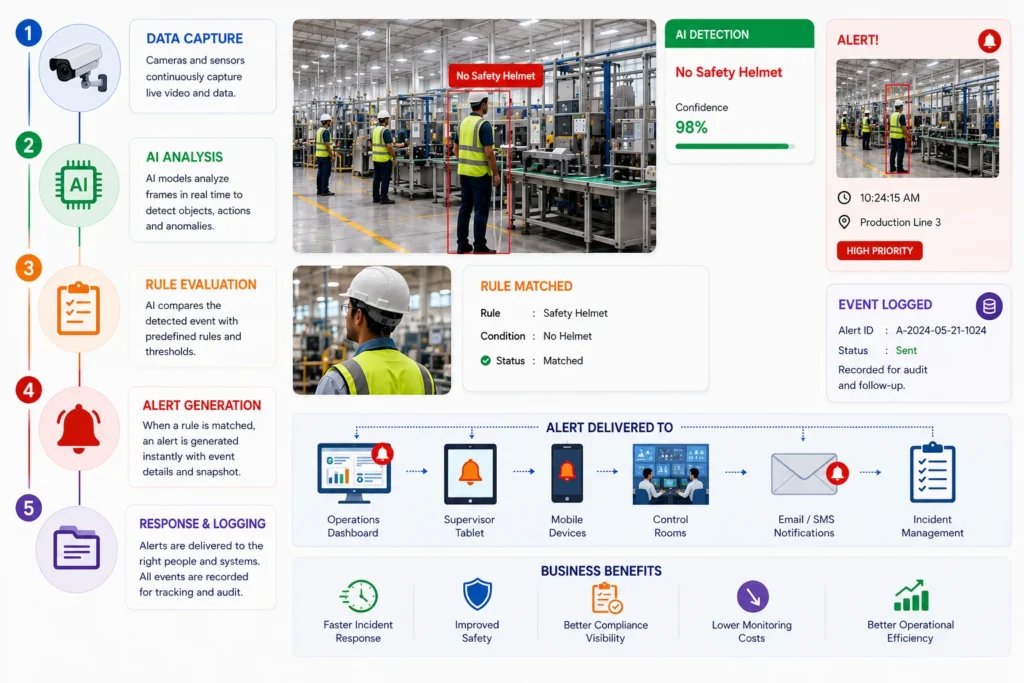
The Journey From Detection to Alert
Real-time alerts are generated through a sequence of automated steps that happen within seconds.
Stage | AI Process | Business Outcome |
Data Gathering | Operational data is continuously gathered by cameras and sensors. | Constant visibility |
AI Analysis | Computer vision analyzes objects, people, and activities | Immediate event recognition |
Rule Evaluation | AI compares observations against predefined business rules | Accurate event identification |
Alert Generation | Notifications are created when conditions are met | Faster response |
Response & Logging | Alerts are delivered and recorded with supporting evidence | Better incident management |
This automated workflow removes the need for someone to constantly monitor multiple camera feeds.
What Triggers a Real-Time Alert?
AI only generates alerts when configured conditions are satisfied. Organizations define these rules based on operational priorities, safety requirements, and compliance policies.
Common alert triggers include:
- Missing personal protective equipment (PPE)
- Unauthorized entry into restricted areas
- Workers approaching hazardous machinery
- Forklift and pedestrian proximity
- Slips, trips, or fall detection
- Blocked emergency exits
- Smoke or fire detection
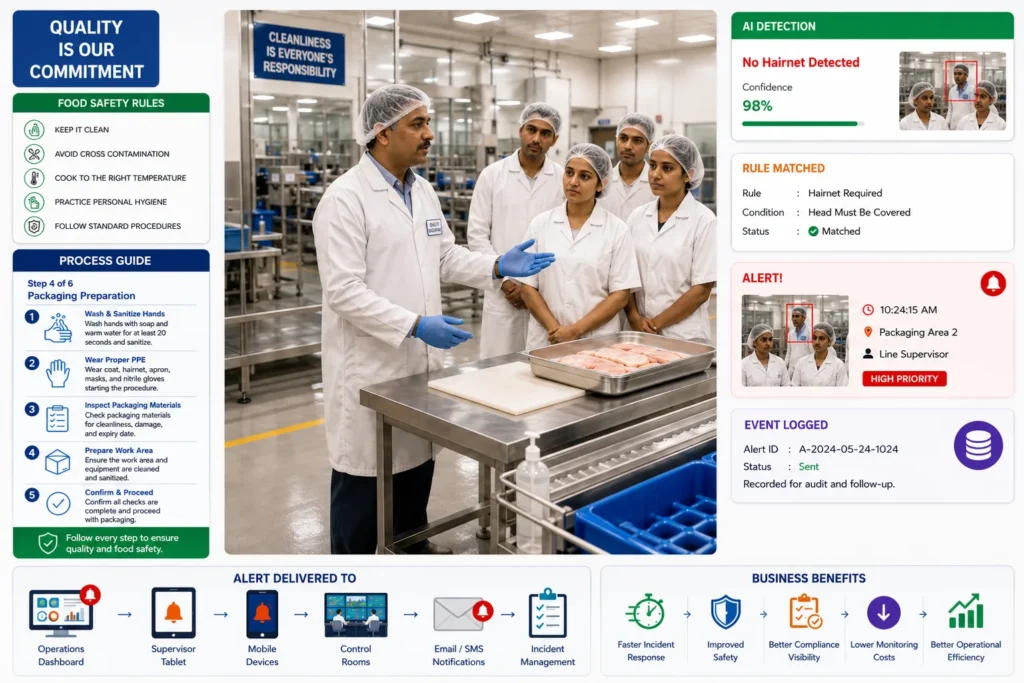
- Hygiene or sanitation violations
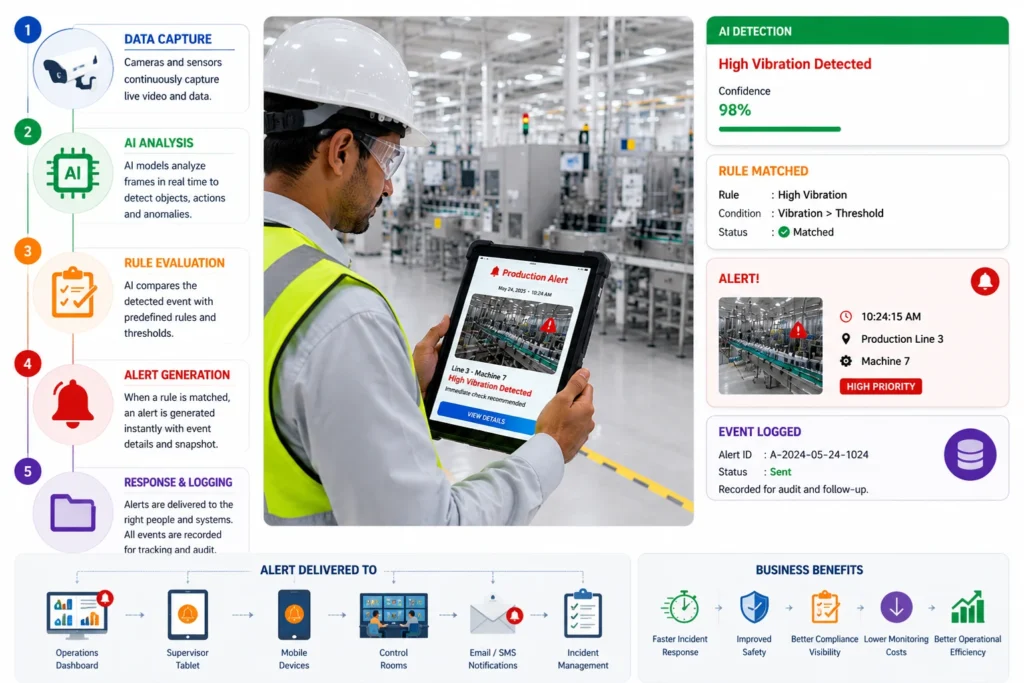
- Machine downtime
- Production line stoppages
- Queue congestion
- Asset movement outside authorized zones
Because alerts are rule-based, businesses can customize monitoring for their specific operations.
Business Benefits of Real-Time Alerts
Organizations that implement AI-based alerting often experience measurable operational improvements.
Key benefits include:
- Faster incident detection
- Reduced manual monitoring
- Improved workplace safety
- Better compliance monitoring
- Shorter response times
- Increased operational visibility
- More consistent incident documentation
- Improved decision-making across multiple facilities
Instead of reacting after an incident has occurred, teams can address issues while they are still developing.
Where Alerts Are Delivered
Once an event is confirmed, notifications can be routed to different systems depending on business needs.
Alert Destination | Typical Use |
Operations Dashboard | Live facility monitoring |
Supervisor Tablet | Immediate operational response |
Mobile Devices | On-the-go notifications |
Control Rooms | Centralized monitoring |
Email or SMS | Escalation for critical events |
Incident Management Systems | Investigation and tracking |
CAPA Workflows | Corrective and preventive actions |
Delivering alerts to the right teams reduces response times and improves accountability.
Making Alerts More Actionable
An effective alert provides more than a notification. It should include enough context for teams to respond quickly.
A typical AI alert may contain:
- Time and date of the event
- Camera location
- Event type
- Image or video snapshot
- Confidence level
- Severity classification
- Recommended response
- Event history for similar incidents
This information helps supervisors understand the situation without reviewing lengthy video recordings.
How Computer Vision Identifies Events
Modern AI uses computer vision models to interpret live video much like a human observer—but continuously and at scale.
The system can recognize:
- People
- Vehicles
- Machinery
- Safety equipment
- Products
- Equipment status
- Movement patterns
- Occupancy levels
- Restricted areas
Rather than simply recording footage, AI evaluates what is happening in each frame and determines whether it matches predefined operational conditions.
Best Practices for Effective AI Alerting
Real-time alerts are most effective when they are carefully configured and regularly refined.
Consider these recommendations:
- Monitor high-risk operational areas first.
- Define clear thresholds for each alert type.
- Prioritize critical events to avoid alert fatigue.
- Regularly review false positives and detection accuracy.
- Integrate alerts with existing incident response procedures.
- Use dashboards to identify recurring trends and improvement opportunities.
Well-designed alert strategies ensure that teams receive timely, meaningful notifications rather than an overwhelming number of unnecessary alerts.
Transforming Events Into Immediate Action
Real-time alerts are one of the most valuable capabilities of AI-powered operational monitoring. By continuously analyzing live activities, identifying important events, and notifying the right personnel within seconds, AI helps organizations reduce response times, strengthen workplace safety, improve compliance, and maintain greater control over day-to-day operations. Rather than relying solely on manual observation, businesses gain continuous awareness that supports faster, more proactive decision-making.
Frequently Asked Questions
How quickly can AI generate an alert?
Most AI systems generate alerts within seconds of detecting a configured event, depending on the deployment architecture and network environment.
Can AI send alerts to multiple people?
Yes. Alerts can be delivered simultaneously to supervisors, control rooms, mobile devices, dashboards, and incident management systems.
Does AI generate alerts for every movement?
No. AI only generates alerts for activities or conditions that match predefined monitoring rules and thresholds.
Can organizations customize alert rules?
Yes. Businesses can configure alert conditions based on their safety policies, operational procedures, compliance requirements, and facility layouts.
What information is included in an AI alert?
Alerts typically include the event type, location, timestamp, supporting image or video evidence, severity level, and relevant operational details to support rapid decision-making.